External API
External API
Connect your own systems to Proto – for example, to tag a customer from your CRM.
The External API lets your own systems work with Proto without anyone opening it – for example, to tag a customer when they upgrade in your CRM. Each request works on one teamspace, and uses that teamspace’s takeover secret to prove it’s allowed.
Get your teamspace ID and takeover secret
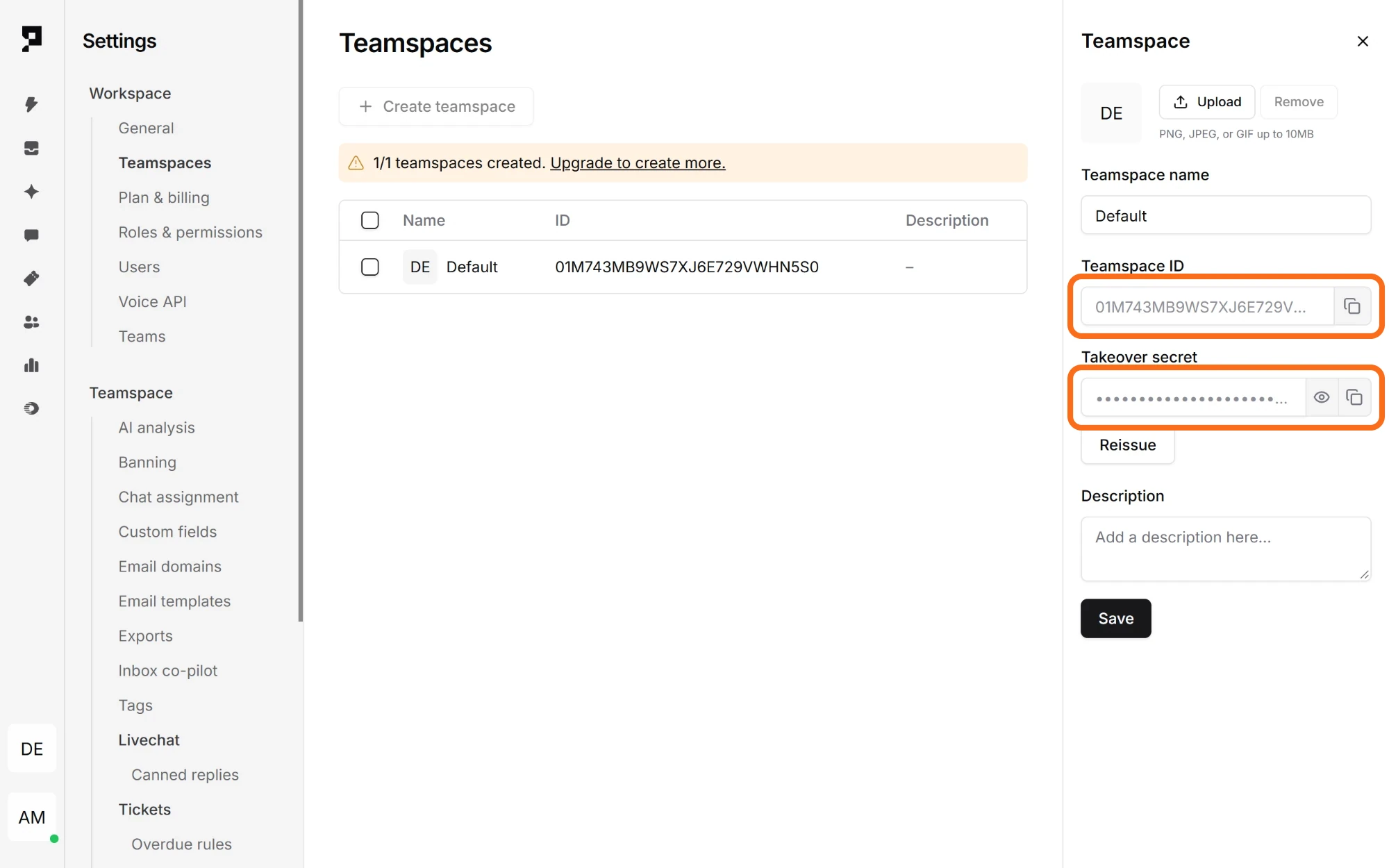
- In the sidebar, select your name, then Settings.
- Under Workspace, select Teamspaces.
- Select your teamspace. Its panel opens on the right.
- Copy the Teamspace ID and the Takeover secret.
Important: anyone with the takeover secret can change your teamspace. Keep it on your server – never put it in a web page or an app. If it gets out, reissue it in the same panel. The old secret stops working straight away.
Checkpoint: you have a Teamspace ID and a Takeover secret.
How requests work
Every request:
- goes to an address that starts with
https://v3-api.proto.cx/api/platform/v1, with your teamspace ID in it - sends your takeover secret as a bearer token – in Postman, on the Authorization tab
- sends its body, if it has one, as JSON
Each request’s page shows its address and an example body. Replace anything starting with YOUR_, such as YOUR_TEAMSPACE_ID, with your own.
A takeover secret only works for its own teamspace. A request for any other teamspace fails.
Times in replies are in UTC, in ISO 8601 – some end in Z and some in +00:00, so use a parser that reads both.
Make your first request
Create a test customer in Postman, then find them in Proto. If this works, every other request will too.
-
In Postman, select + to open a new request.
-
Change GET to POST, and paste this address. Replace
YOUR_TEAMSPACE_IDwith your teamspace ID:https://v3-api.proto.cx/api/platform/v1/customers/YOUR_TEAMSPACE_ID/create-customer/TEST-1/v2 -
On the Authorization tab, set Auth Type to Bearer Token, and paste your takeover secret in Token.
-
On the Body tab, select raw, then JSON, and paste:
{ "name": "Test Customer", "email": "test.customer@example.com" } -
Select Send. Proto replies
200 OKwith the new customer, withTEST-1as theirprovided_unique_id. -
In Proto, select People in the sidebar. Test Customer is in the list.
Checkpoint: Test Customer is in People, with
TEST-1as their Unique ID.
If it doesn’t work:
401– the takeover secret is missing or wrong. Copy it again.403– the takeover secret is for a different teamspace than the ID.400Customer already exists – you’ve already madeTEST-1. Change it toTEST-2in the address.
If something goes wrong
The response’s status code says what went wrong. Most errors also include a message and a code, such as:
{ "detail": "Customer not found", "code": "RESOURCE_NOT_FOUND" }| Status | Code | What it means |
|---|---|---|
400 | INVALID_INPUT | Proto can’t do what the request asks. Each endpoint’s page says when. |
401 | – | The takeover secret is missing or wrong. |
403 | PERMISSION_DENIED | The takeover secret is for a different teamspace. detail is null. |
404 | RESOURCE_NOT_FOUND | Something in the path, such as the customer, isn’t in your teamspace. |
422 | REQUEST_VALIDATION_ERROR | The request is missing something or has the wrong type of value. Instead of detail, the response has a data list saying which fields are wrong. |
429 | – | You’ve sent too many requests. Wait until the time in the Retry-After header, then try again. |
500 | OPERATION_FAILED | Something went wrong in Proto. If it keeps happening, contact us with the X-Request-ID header from the response. |
The limit on requests is shared by every endpoint in your teamspace. A 429 response also says what the limit is, in its X-RateLimit-Limit and X-RateLimit-Window headers.
Endpoints
| Area | What you can do |
|---|---|
| Customers | Create, update and get a customer; list customers changed in a date range; add and remove tags; set custom fields |
| Conversations | Create a ticket; reply to a ticket by email; add an internal note; change a status; get details and messages; list livechats, tickets and messages in a date range |
| Custom fields | List, create and delete custom fields, and set them on a ticket |
| Teams and users | Find a team by name and list users by status |
| Voice | Transcribe audio, in the background for long recordings; turn text into speech |