Workflows
Send attachment
Send the person an image, audio, video or document.
Send attachment sends a file to the person – such as a price list, a map or a how-to video.
Settings
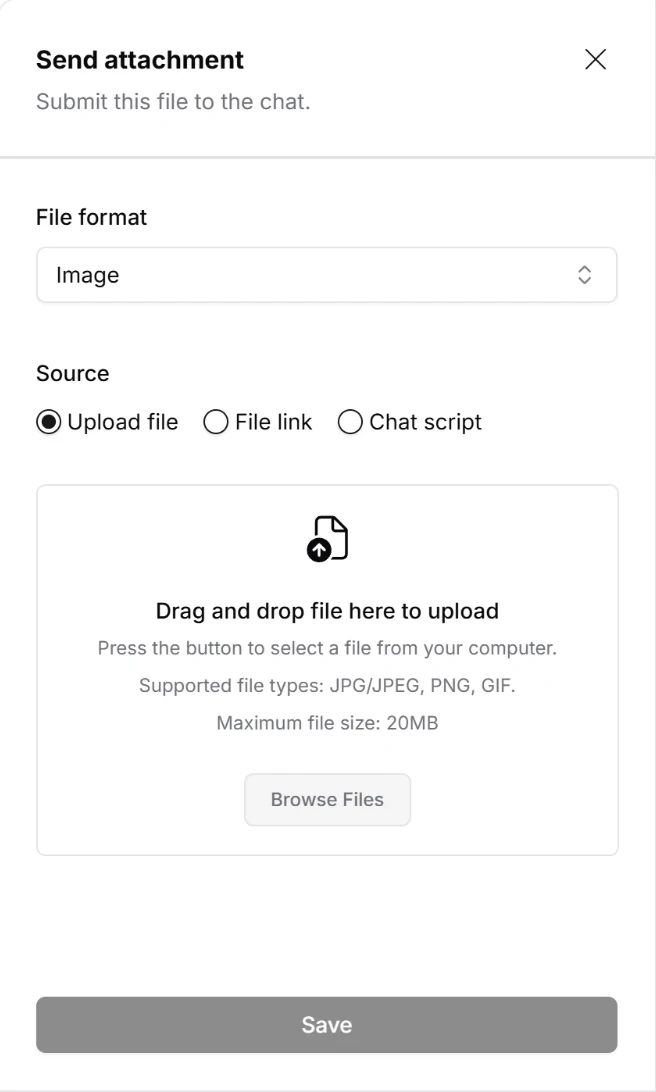
| Setting | What it does |
|---|---|
| File format | Image, Audio, Video or Document. It’s locked while a file or link is added – remove it first to change the format. |
| Source | Where the file comes from – Upload file, File link or Chat script. |
Then, depending on the Source:
- Upload file – drag a file in, or browse for one. It can be up to 20 MB.
- File link – enter the file’s web address. Proto shows a preview, so you can check it loads.
- Chat script – an expression that gives the file’s web address, such as
"https://example.com/invoices/" + invoice_id + ".pdf".
| File format | File types you can upload |
|---|---|
| Image | JPG, PNG and GIF |
| Audio | MP3, M4A and WAV |
| Video | MP4, AVI and MOV |
| Document | PDF, CSV, Word, Excel and PowerPoint |
Each language can have its own file.
What happens
The person gets the file, then the workflow carries on. In Webchat, images show in the chat, audio and video play in the chat, and documents open in a new tab.
Good to know
- File link doesn’t fill in variables. For a web address that changes, use Chat script.
- If Proto can’t load a link, it sends nothing and the workflow carries on – the person isn’t told. Check that the file is public, and test the link in the AI Agent tester.