Workflows
Live agent handoff
Pass the chat to a live agent on your team, who answers it from the Inbox.
Live agent handoff passes the chat from your AI agent to a person on your team – a live agent – who answers it from the Inbox. Your AI agent stops replying until the chat is handed back.
Settings
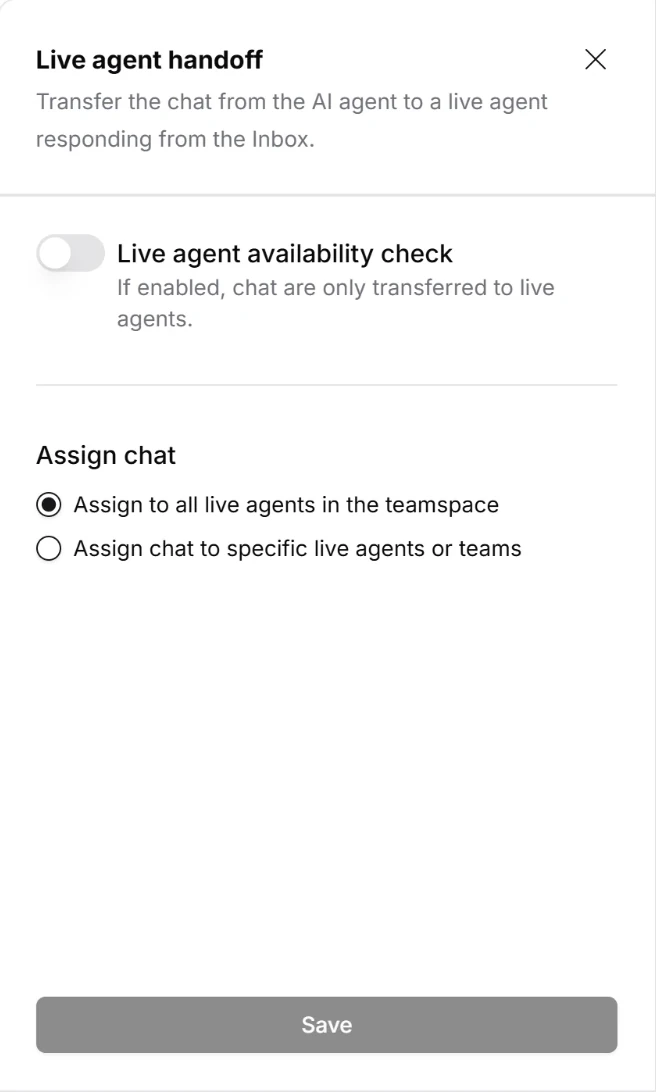
| Setting | What it does |
|---|---|
| Live agent availability check | Off – the chat always goes to your team, and waits in the queue if nobody’s free. On – if nobody is online, the chat stays with your AI agent and the If there is no live agent online branch runs. |
| Assign chat | Assign to all live agents in the teamspace, or Assign chat to specific live agents or teams. |
| Assign teams or live agents | With specific live agents or teams: who can get the chat. Proto tries them in the order you list them. |
| Assign by language (optional) | A different list for each of your AI agent’s languages – for example, French chats to your French-speaking team. Chats in a language without a list use the main one. |
What happens
Proto looks for someone to take the chat, following your teamspace’s assignment settings. Only live agents who are online, and teams with someone online, can be chosen.
| Result | What happens next |
|---|---|
| Someone is free | The chat is assigned to them. Your AI agent stops. |
| Nobody is free, availability check off | The chat waits in the queue until someone can take it. Your AI agent stops. |
| People are online but busy, availability check on | The chat waits in the queue. Your AI agent stops. |
| Nobody is online, availability check on | The chat stays with your AI agent, and If there is no live agent online runs. |
While a live agent has the chat, your AI agent doesn’t reply to the person.
Branches
| Branch | Runs when |
|---|---|
| If there is no live agent online | Live agent availability check is on and nobody who could take the chat is online. Shown only with the check on. |
| When live agent transfers back to AI agent | A live agent selects Transfer back to AI agent in the Inbox. This also resolves the chat. |
Tip: with the availability check on, use If there is no live agent online to offer something else – such as Create ticket, so your team can reply by email later.
Good to know
- The handoff sends no message itself. Add a Send message before it, such as I’ll connect you with our team – it may take a few minutes.
- With the availability check off, a chat can wait in the queue for a long time when nobody’s working. Turn the check on if you don’t have someone online at all hours.