Workflows
SQL Query
Read from your own PostgreSQL or MySQL database, and save the rows for the rest of the workflow.
SQL Query runs a read-only query on your own database and saves the rows – such as a customer’s balance, their last orders or a branch’s opening hours.
Important: SQL Query is only on the Enterprise plan.
Before you start
Connect your database. You can connect PostgreSQL and MySQL databases.
- In the sidebar, select your name, then Settings.
- Under Teamspace, select Database connections, then Connect database.
- Enter a Name, choose the Database type and save.
- Fill in the Credentials and Authentication. Turn on SSL/TLS if your database needs an encrypted connection.
- Add the IP address under Whitelist Proto proxy IP to your database’s allowlist, so Proto can reach it.
- Select Save, then Test connection.
Checkpoint: the connection’s Status says Connected.
Once it’s tested, a connection’s settings are locked. To change them, delete the connection and add it again.
Tip: connect with a database user that can only read the tables your workflows need.
Settings
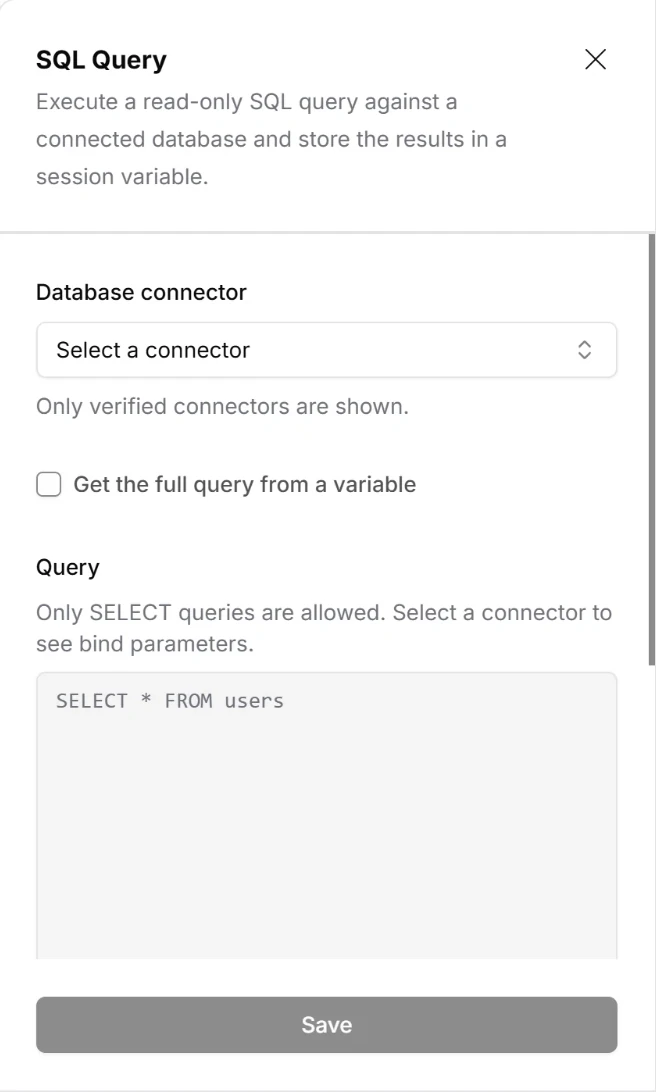
| Setting | What it does |
|---|---|
| Database connector | Which database to query. Only tested connections are listed. |
| Query | A SELECT query. Put values in as bind parameters – see Use values in a query. |
| Bind parameters | The value for each parameter in the query. Proto lists them as you write it. |
| Get the full query from a variable | Run a whole query saved in a variable, such as query, instead. It must still be a SELECT. |
| Timeout after (seconds) | How long to wait, from 30 to 60 seconds. 30 unless you change it. |
| Resulting variable | Required. Where to save the rows, such as query_results. |
Use values in a query
Don’t put variables in the query itself. Use a bind parameter, and give it a value. Bind parameters keep the person’s answers from changing your query.
PostgreSQL – number the parameters $1, $2 and so on, with no gaps:
SELECT balance FROM accounts WHERE email = $1Then, under Bind parameters, give $1 the value {email_address}.
MySQL – name each parameter:
SELECT balance FROM accounts WHERE email = %(email)sThen, under Bind parameters, give email the value {email_address}.
What happens
Proto runs the query on your database, with the bind parameters filled in, and saves the rows in your Resulting variable. Then it runs the branch that matches the result. The person doesn’t see anything.
Branches
| Branch | Runs when |
|---|---|
| Success | The query ran. It may still have returned no rows. |
| Error | The query or connection failed, or a bind parameter uses a variable that doesn’t exist. What went wrong is in _sql_query_error. |
| Timed out | The query took longer than Timeout after (seconds). |
Use the result
The rows are saved as a list, with each row’s columns by name:
| To | Write |
|---|---|
| Check a row came back, in a Branch | query_results |
| Show the first row’s balance, once you know there’s a row | {query_results[0].balance} |
| Draw the rows as a chart | query_results in Send graph |
Add LIMIT to your query – every row it returns is saved.
Good to know
- Only
SELECTqueries run, and the connection itself is read-only. - Words that change data or settings – such as
UPDATE,DELETE,SET,REPLACE,START,DO,ENDandCOMMENT– are blocked anywhere in the query, outside quotes. That includesCASE … END, theREPLACE()function and columns with those names. In PostgreSQL, put such a column’s name in double quotes, such as"comment". MySQL has no way round it – use a view that renames the column. - SQL Query can’t be added to the Chat closed workflow.
- Each run counts towards your interactions.