Workflows
Collect feedback
Ask the person to rate the chat, and answer a few questions, when it closes.
Collect feedback asks the person to rate the chat from 1 to 5, and can ask a few more questions. It’s in the Chat closed workflow of every AI agent, so it runs whenever a chat closes.
You can’t add it anywhere else, but you can change it or turn it off. To find it, open the Chat closed workflow on the Workflows tab, then select Collect feedback.
Settings
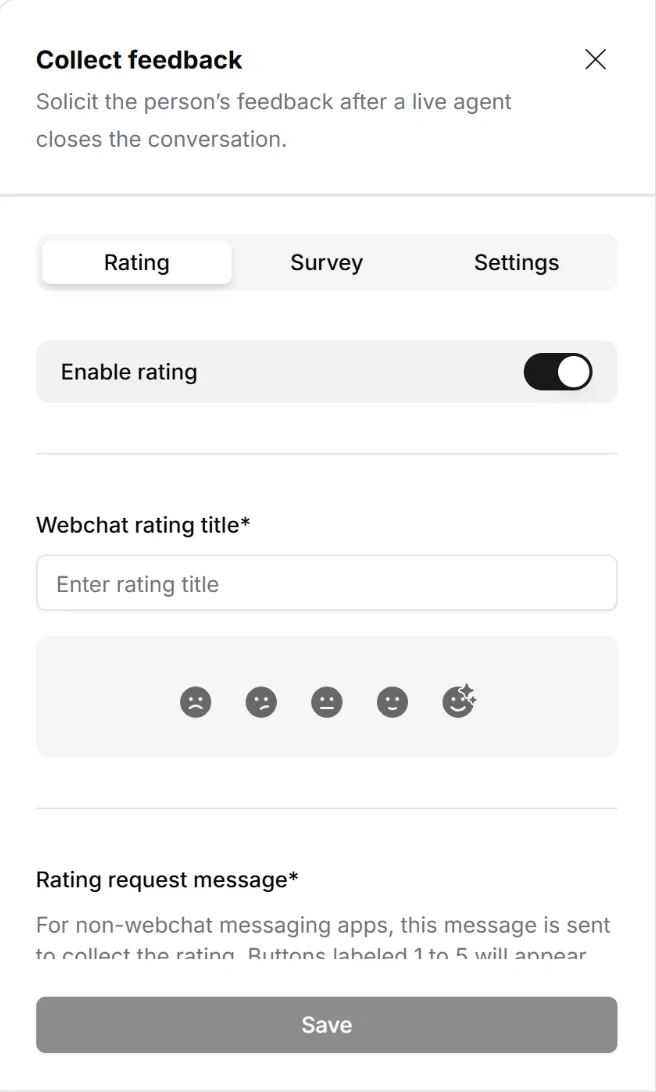
The panel has three tabs.
Rating
| Setting | What it does |
|---|---|
| Enable rating | Turns the 1 to 5 rating on or off. |
| Webchat rating title | The question above the rating faces in Webchat, such as Please rate the conversation. |
| Rating request message | The question on other channels, such as WhatsApp. The person answers with a number from 1 to 5 – most channels show buttons for it. |
| Set chat variable | Where the rating is saved. It’s feedback_rating unless you change it. |
Survey
Turn on Enable survey, then select Add field for each question – up to 10. For each one:
| Setting | What it does |
|---|---|
| Question | What to ask, such as Do you have any other comments? |
| Required field | Whether the person must answer. |
| Reply type | Open response accepts anything. Number, Email and Phone check the answer. |
| Webchat field placeholder | The hint in the empty answer box in Webchat. |
| Create variable | Where the answer is saved, such as feedback. |
Thank-you message
| Setting | What it does |
|---|---|
| Feedback submission text | What the person sees once they’ve sent their feedback, such as Thank you for your feedback! |
Fill in each text in your AI agent’s default language. Other languages use it until you translate them.
What happens
- In Webchat, a feedback form appears in the chat, with five faces to rate the chat, the survey questions and a Submit feedback button.
- On other channels, your AI agent asks for a rating from 1 to 5, then asks the survey questions one at a time. The person can reply skip to a question that isn’t required.
The rating and answers are saved with the chat, and live agents are told when feedback comes in.
Good to know
- The form expires after 24 hours. After that, the person sees This survey has expired.
- Feedback isn’t collected on email or in group chats.
- To stop collecting feedback, turn off the action’s Enabled switch.