Workflows
Auto team match
Find the team that best fits what the person said, such as a department or branch name.
Auto team match finds the team whose name best fits some text – such as the department or branch the person asked for – and saves it in a variable. It doesn’t assign the chat: use the result in later actions.
Before you start
Give each team the other names people use for it. In Settings, under Workspace, select Teams, then a team. In Alternative names, enter one name per line – for example, Accounts, Invoices and Payments for a Billing team.
Settings
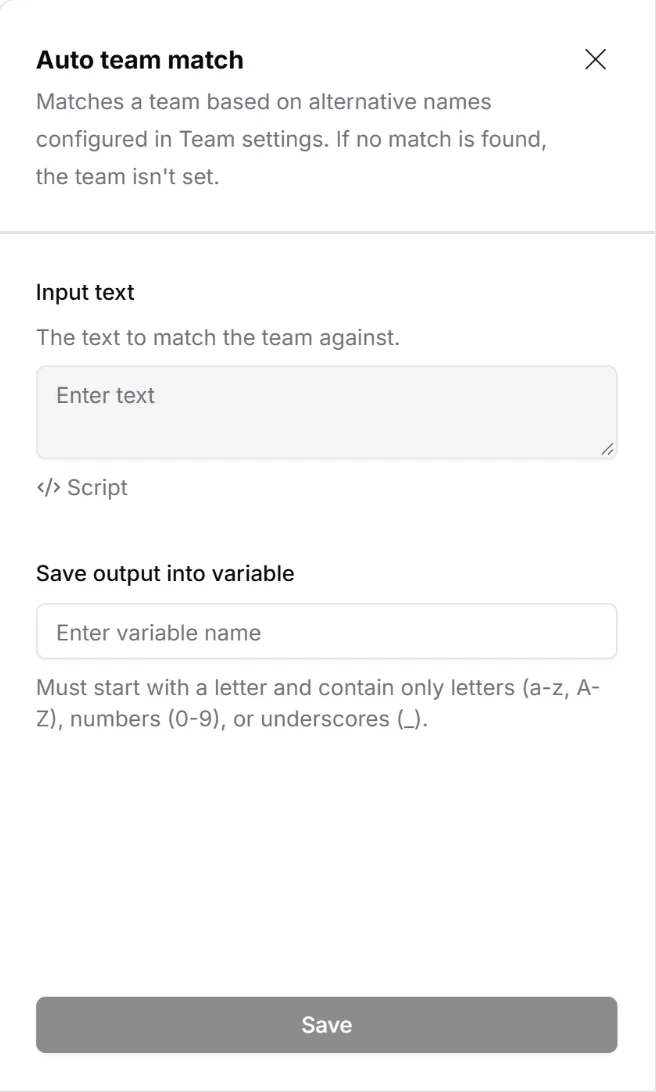
| Setting | What it does |
|---|---|
| Input text | The text to match, such as {department} or {_user_input}. |
| Save output into variable | Where to save the team, such as team. |
What happens
Proto compares the Input text by meaning with each team’s name and Alternative names, for the teams in this teamspace. It works across languages, so facturación can match a team called Billing.
If a team is a close enough match, it’s saved in your variable:
| Part | What it holds | Example |
|---|---|---|
name | The team’s name | {team.name} |
matched_name | The name or alternative name that matched | {team.matched_name} |
id | The team’s ID | team.id |
score | How close the match was, from 0 to 1 | team.score |
tags, tag_groups | The team’s tags and tag groups | team.tags |
The person doesn’t see anything.
Branches
| Branch | Runs when |
|---|---|
| Match found | A team is a close enough match. |
| No match | No team is close enough, or there are no teams. Your variable is empty. |
| Error | Something went wrong. What went wrong is in _auto_team_match_error. |
Use the result
Auto team match doesn’t assign the chat, so use the result to route it to the team yourself:
- Under Match found, select Add action → Branch.
- In the If condition, enter
team.name == "Billing". Select Add Condition to add an Else if for each other team, such asteam.name == "Sales". - Under each condition, add a Live agent handoff to that team.
- Under Else, add a Live agent handoff to all live agents, for a team you haven’t added a condition for.
Tip: add a Live agent handoff to all live agents under No match too, so the chat still reaches someone.
Good to know
- If Input text is empty, the action is skipped and the workflow carries on.
- Each run counts towards your interactions.