Workflows
LLM Processing
Ask a large language model to write, summarise, classify or extract something, and save the result.
LLM Processing gives a prompt to a large language model and saves what it writes in a variable – for example, to summarise a complaint for your team, sort a message into a category or pull a date out of what the person said.
Settings
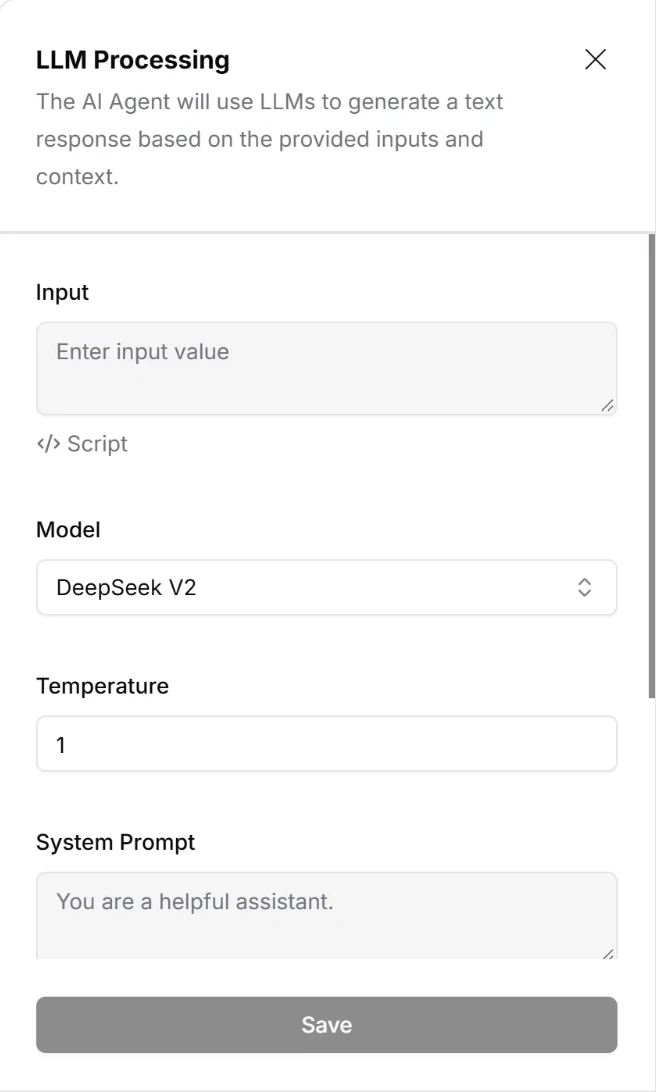
| Setting | What it does |
|---|---|
| Input | What to give the model, such as {_user_input} or {description}. |
| Model | GPT 4o, DeepSeek V2, Qwen 2.5 or Llama 3.2. DeepSeek V2 unless you change it. |
| Temperature | From 0 to 2. Lower gives steadier, more predictable answers; higher gives more varied ones. 1 unless you change it. |
| System Prompt | What the model should do with the input, such as Summarise this complaint in one sentence for a live agent. |
| Use Knowledge info to provide more context | Also gives the model the parts of your AI agent’s knowledge that match the input. |
| Resulting variable | Where to save the result, such as summary. |
Input and System Prompt can include variables.
What happens
The model gets your System Prompt and Input, and its answer is saved in your Resulting variable. The workflow then follows a branch.
Important: the person doesn’t see the result. To send it, add a Send message under Success, such as
{summary}.
The model only sees what you give it – not the rest of the chat. To include more, put it in the Input, such as Order: {order_number}. Message: {_user_input}.
Branches
| Branch | Runs when |
|---|---|
| Success | The model replied. Its answer is in your variable. |
| Error | Something went wrong, such as the model being unavailable. |
| Timed out | The model took longer than 30 seconds to reply. With GPT 4o, a slow reply goes to Error instead. |
Examples
| To | System Prompt | Then |
|---|---|---|
| Summarise for your team | Summarise this complaint in one sentence. | Use {summary} as the Description in Create ticket. |
| Sort a message | Reply with one word: billing, delivery or other. | Branch on category == "billing". |
| Pull out a detail | Reply with the order number only, or “none”. | Use {order_number} in Send API. |
Tip: when you’ll test the result in a Branch, ask for a single word from a fixed list, and keep Temperature low – such as 0.2.
Good to know
- LLM Processing can’t be added to the Chat closed workflow.
- Each run counts towards your interactions.